


Rockbot - Request Music
4.24.31K Reviews
App Specs
- Version
- 3.10.3
- Updated On
- License
- Free
- Downloads
- 500,000+
- Developer
- Rockbot, Inc.
- Categories
- Music & Audio
- Platform
- Android
Screenshots
 Analysis by AppCompare
Rockbot - Request Music is the kind of music and audio app I would open when the room, venue, or shared space should have a say in what plays next. Instead of treating music as a completely private activity, it places the listening experience around requests and participation. That makes it more interesting than a basic player in the right setting, although it also means the quality of the experience depends heavily on the connection and on how actively people use it.
I reviewed it as a free app from Rockbot, Inc., available for Everyone and running on Android devices using at least version 5.0. It has been around since February 10, 2011, and the current version is 3.10.3. With an average rating of 4.2 from around twelve thousand ratings and more than 500 thousand installs, it has clearly found an audience beyond a small experiment. My view is that its appeal is quite specific: it is most useful when you want to influence music in a shared environment, not when you simply need a private replacement for your everyday streaming service.
Where the connection changes the experience
The first thing I noticed is that Rockbot - Request Music feels tied to the moment in which it is being used. A normal music library can be useful on a train, in a quiet room, or during a walk because the listener controls nearly everything. Rockbot is more situational. Its value appears when requests, playback, and the surrounding place are connected. If the network is responsive, the app feels immediate and social. If the connection is weak, the central reason to use it becomes much less convincing.
That distinction matters before you install it. I would not choose this app as my only music tool for a long trip or as a dependable personal library. I would choose it when I am in a shared place where the music selection is part of the atmosphere and I want a way to participate without taking over the controls. The app’s store summary, “Play Music You Love, Anywhere,” sounds broad, but my practical reading is narrower: it is at its best when “anywhere” includes a connected, shared listening context.
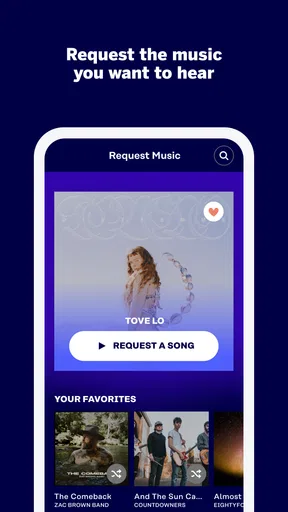
In a café, gym, workplace, or similar setting, the request model can make music feel less passive. Rather than accepting whatever is already playing, I can look for something that suits the moment and send a request. That small action changes my relationship with the soundtrack. I am no longer just waiting for a familiar song to appear; I am trying to shape the next part of the atmosphere.
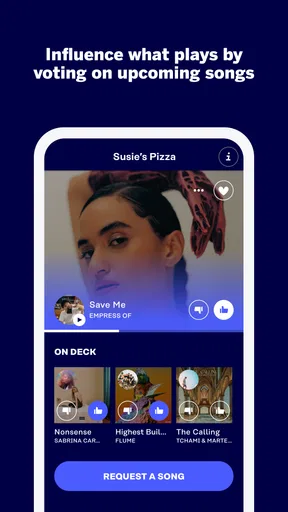
The important trade-off is that participation is not the same as control. A request can influence the listening queue without turning the app into a personal remote control. That is a healthier design for shared spaces, where several people may want different things, but it can disappoint anyone expecting an instant, private playback command. I found it better to approach the request as a suggestion to the room rather than a guaranteed order.
What happens in an ordinary day
Imagine arriving at a gym after work. The music is acceptable, but it is not helping your energy. With Rockbot open, you can look for a track that fits your workout and request it instead of settling for the current selection. The useful part is not only the song itself; it is the feeling that the soundtrack can respond to the people in the room. If the network is stable, the process can be quick enough to feel natural rather than like an interruption.
Worth Reading Before You Choose

EA SPORTS FC Mobile 26 Is a Bigger Football Game, but It Takes Time

Flipboard Shows What News Apps Must Do Beyond the Feed

Switching to Android Auto Means Rethinking Your Driving Routine

Google Calendar Makes a Crowded Week Easier to Manage

Ludo King Makes the Most of the Minutes Between Plans

Baby Panda World Brings Quick Play to Modern Phones, but Its Game Library Feels Busy
Now imagine the same situation in a basement workout area with an unreliable signal. The app may take longer to respond, and the request process becomes less satisfying because the feedback loop is slower. You are left wondering whether the action went through, whether the queue changed, or whether you should try again. That is why I would avoid repeatedly tapping when the response is delayed. A cautious single attempt is better than accidentally submitting the same idea more than once.
This is one of the app’s less obvious lessons: the surrounding network is part of the user experience, even though the app is about music. A strong connection makes the interface feel like a live conversation with the venue. A poor one makes it feel like a form being sent into the distance. Before blaming the app, I would check whether other online services are also slow in the same location.
Using it on a phone without making the moment awkward
Rockbot works best when the phone remains a supporting tool rather than becoming the main event. I would open it, make a considered request, and put the phone away. That approach suits a shared environment better than browsing endlessly. The app is not especially valuable if you spend the whole visit staring at a screen while the music plays around you.
There is also a social judgment involved. A request that fits the mood of the place is more likely to feel useful than one chosen only because it is your personal favorite. In a busy gym, something energetic may make sense; in a relaxed workplace, a disruptive choice may not. The app gives you a voice in the soundtrack, but it does not remove the need to read the room.
I also like the idea of using it in short visits. If I have only a few minutes in a shared space, I can make one request and move on. If I am staying longer, I can pay attention to how the music changes before deciding whether another request would add anything. This avoids treating the queue like a personal playlist and respects the fact that other listeners are participating too.
For people with older phones, the minimum operating-system requirement is relatively approachable: Android 5.0 or later. That makes the app accessible to users who are not carrying a recent flagship. Still, an older device may make switching between apps or recovering from a stalled connection feel less smooth. I would keep expectations realistic if the phone is already struggling with other online apps.
Handling slow responses, interruptions, and recovery
Connectivity problems are the area where I would be most careful. When a request takes time to register, the natural reaction is to press again. That is exactly the habit I would avoid. Wait for a visible response before repeating the action, then leave the screen and return only if necessary. This simple workflow reduces confusion and prevents a temporary delay from turning into multiple attempts.
If the app appears stuck, I would first move to a place with a better signal rather than immediately assuming the request failed. In a building with thick walls or crowded public Wi-Fi, even a small change in position can make online interactions more reliable. If the rest of the phone’s internet connection is working normally, closing and reopening the app is a reasonable next step. I would use that as recovery, not as a routine after every tap.
Another practical habit is to decide what you want before opening the request screen. Searching while the connection is unstable can make the whole process feel worse, because every stage becomes uncertain. Having a song or artist in mind shortens the time spent waiting for results and makes it easier to recognize whether the action completed. This is a small but meaningful improvement for anyone using the app in a noisy or busy place.
The app is also not the right choice for situations where uninterrupted personal listening is the priority. If I am boarding a flight, walking somewhere with inconsistent reception, or trying to create a carefully controlled listening session, I would use a conventional music service or a player built around my own library instead. Rockbot’s shared-request identity is a strength in public settings and a limitation when independence matters more than participation.
Making the experience kinder to mobile data
I would not treat Rockbot as a reason to ignore a phone’s data limits. Music-related apps can involve network activity beyond the few seconds spent choosing a request, and the safest approach is to use it deliberately when mobile data matters. A connected venue’s Wi-Fi may be convenient, but I would still avoid assuming that every public network is fast or stable simply because it is available.
My preferred routine is simple: connect before opening the app if a trusted network is available, prepare one request instead of repeatedly browsing, and avoid refreshing the same screen while waiting. This is not only considerate of data usage; it also makes the interaction less frustrating. Repeated searches and retries are usually a sign that the connection needs attention, not that more tapping will solve the problem.
If you have a limited data plan, Rockbot is best used as an occasional participation tool rather than something left open throughout an entire visit. Make the request, confirm what you can, and close it. That workflow also preserves battery and keeps the phone from becoming a distraction. I would be especially cautious in places where the signal changes constantly, because an unstable connection can encourage repeated attempts.
There is a useful difference between data-conscious use and avoiding the app altogether. The request feature may be worth the small amount of online activity when the surrounding music really matters to you. The trade-off is less attractive if you are only curious and could just listen to your own downloaded or locally available music. In that case, a traditional player gives you more certainty and usually requires less interaction with a live service.
Who will enjoy it, and who should skip it
I think Rockbot is a good fit for people who enjoy having some influence over music in shared places. It suits someone who visits venues where requests are part of the experience, someone who likes discovering what other people choose, or someone who wants a quick way to suggest a mood without managing a full playlist. It can also appeal to users who prefer participating lightly rather than taking responsibility for the entire soundtrack.
I would recommend skipping it if you want complete control over order, playback timing, or personal listening conditions. It is also a weaker match for listeners who spend most of their time offline, have a very restricted data plan, or dislike waiting for network responses. A standard streaming app is better for deep catalog browsing and private listening, while a local music player is better when reliability matters more than live interaction.
Compared with ordinary streaming services, Rockbot feels less like a personal catalog and more like a communication layer around music. A streaming service usually starts with your account, your recommendations, and your queue. Rockbot starts with the shared setting. That difference explains both its charm and its boundaries. It does not need to replace your usual app; it can occupy a different role when the room itself is part of the listening experience.
Compared with simply asking staff for a song, the app can be more convenient and less intrusive. You can make the request from your own phone without interrupting someone who is working. The downside is that a digital request can feel less certain than a direct conversation, especially when the connection is slow. I would use the app for normal participation and speak to staff when the request is important or the interface is not responding.
Small habits that make requests work better
Choose the track before you start tapping through screens. This reduces time spent waiting and makes it easier to notice whether the request was accepted.
Submit once, then give the connection time to respond. A delayed screen does not automatically mean the first attempt failed.
Match the choice to the setting. The strongest requests support the atmosphere instead of treating a shared venue like a private room.
Use a trusted connection when practical, especially during a long visit or when your mobile data is limited.
Keep a conventional music app available for personal listening. Rockbot works alongside that kind of service better than it replaces it.
These habits may sound basic, but they address the app’s real friction points. The challenge is rarely understanding the idea of requesting music. It is knowing how to use that idea without expecting instant control, wasting data, or repeating actions when the network is simply taking its time.
My verdict on the connected listening model
After using it with the right expectations, I see Rockbot - Request Music as a focused tool rather than an all-purpose music app. Its strongest quality is the way it connects a phone to the atmosphere of a shared place. When the network behaves and the setting welcomes participation, a simple request can make the soundtrack feel more personal without making it entirely yours.
The limitations are equally clear. A weak connection can undermine the central interaction, and the shared queue means your request should be understood as influence rather than guaranteed control. People who want offline certainty, private playback, or a highly organized personal library will be happier with a conventional alternative.
For me, the decision comes down to context. If I am going somewhere where music is already being managed for a group, I would install this free Music & Audio app and keep it ready. Its Everyone age rating and broad Android compatibility make it approachable, while its established presence and around 4.3 thousand written reviews suggest that many users have found a reason to return to the concept. I would not abandon my regular music player for it, but I would recommend it to a friend who wants a practical way to join the soundtrack instead of only listening from the sidelines.
My final recommendation is conditional but positive: use Rockbot when the venue, the people, and the connection are working together. In that narrow space, it offers something a normal player does not. Outside it, the app’s dependence on live interaction becomes more noticeable, and another music option will usually be the smarter choice.
Pros
- Lets venues tailor playlists to match their atmosphere and audience.
- Users can request songs directly from participating locations.
- Artist and song information makes discovering new music easier.
- Works well for social settings without requiring personal headphones.
- Requests can make the listening experience feel interactive and personal.
Cons
- Availability depends on whether the venue supports Rockbot.
- Some song requests may be rejected by venue rules or music filters.
- The catalog and playback options can vary between locations.
- Popular venues may receive too many requests for yours to play.
- Requires an internet connection and may use mobile data while browsing.
FAQs for Rockbot - Request Music
What is Rockbot - Request Music, and how does it work?
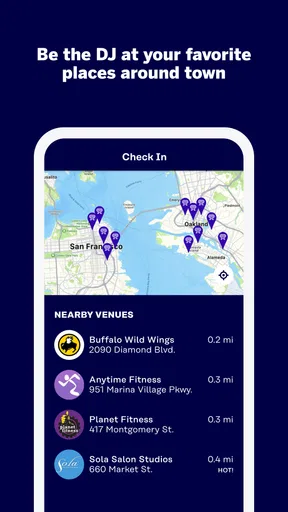
Rockbot - Request Music is an interactive jukebox platform that lets people influence the music playing in participating bars, restaurants, gyms, bowling alleys, and other venues. After opening the app, you can find a supported location, browse its available catalog, and request songs. Depending on the venue’s settings, requests may play immediately, enter a queue, or require credits or payment.
Can I use Rockbot - Request Music anywhere, or only at participating venues?
The app is designed primarily for use at locations that have Rockbot installed and activated. It is not a general music player that works independently in every place. Before downloading or purchasing credits, check whether your current venue appears in the app and whether its jukebox is online. Features, song availability, and request rules can vary considerably from one location to another.
Do I have to pay to request songs on Rockbot?
Some Rockbot venues allow free song requests, while others charge for requests or use credits, depending on the venue’s configuration. The app normally displays the cost before you confirm an action, but prices and available options can differ. You may also encounter venue-specific promotions or limits. Review the final request screen carefully so you understand whether a charge will be applied.
Why might my requested song not play immediately, or not play at all?
A request does not always guarantee immediate playback. Venues can limit how often one person may request music, place songs in a queue, prioritize other users, or use moderation settings that block explicit or unsuitable content. A song may also be unavailable because of licensing, catalog changes, connection problems, or a venue employee’s decision. Checking the queue and venue rules can clarify what happened.
Is Rockbot - Request Music safe to use, and what permissions does it need?
Rockbot generally needs standard permissions and account information to help identify your location, connect you with nearby participating venues, process requests, and handle optional payments or rewards. Location access may be useful but is not always necessary if you search manually. As with any app involving accounts or purchases, review its privacy policy, use a secure sign-in method, and confirm payment details before completing transactions.


